Welcome to the all-new Infotainment.com!
Find parts for your car
Low Stock

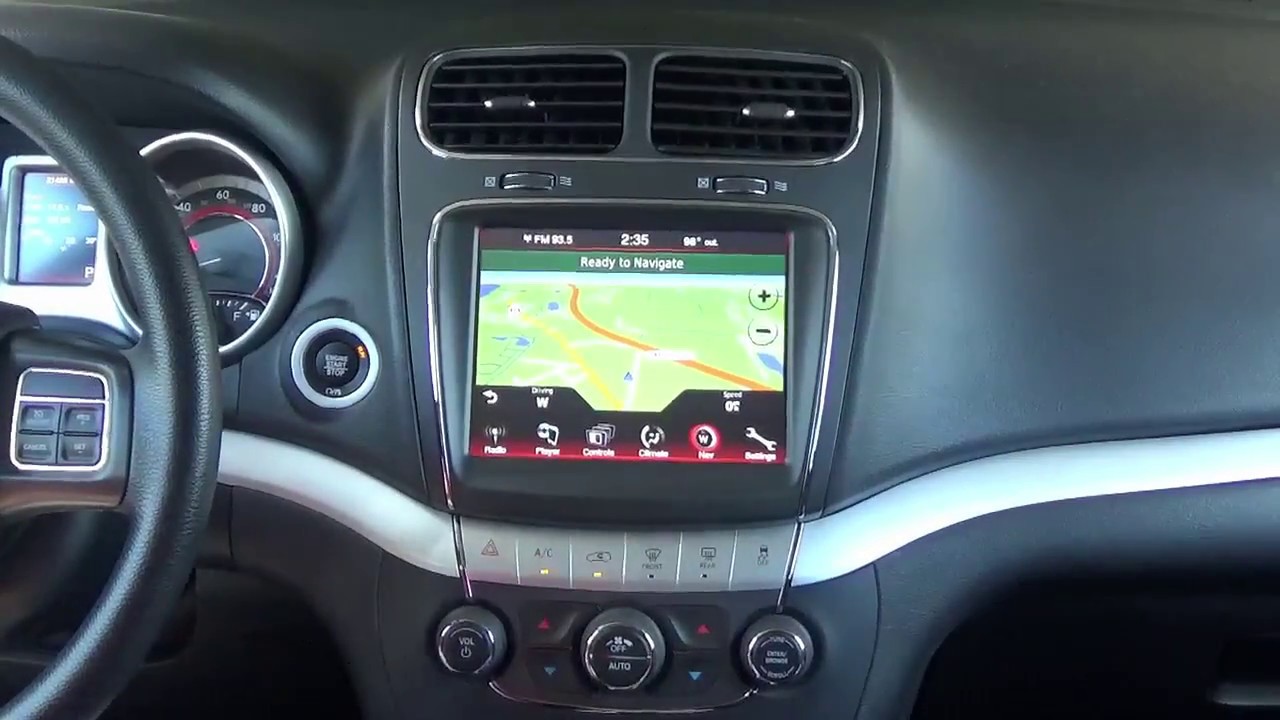
2011-2020 Dodge Journey Uconnect 3™ RB5 8.4N 8.4" Display with Garmin™ GPS Navigation

$0.00
Add protection plan Recommended
Fast Shipping Options Fast Shipping Options
Expert Advice Expert Advice
30-Day Returns 30-Day Returns
1-Year Warranty 1-Year Warranty

Overview

Upgrade your 11-20 Dodge® Journey with the factory OEM 8.4-inch Uconnect 3™ Infotainment system.

Enjoy new-highly sought after features for the Dodge you love and bring modern technology to your ride:

  • 8.4-inch Mopar® responsive touchscreen display
  • Embedded built-in GARMIN™ GPS Navigation (optional)
  • SiriusXM™ capability
  • HD Radio™
  • Bluetooth® hands-free calling and audio streaming
  • Voice command capability
  • Easy access to entertainment and vehicle settings

Stay Connected. Stay in Control.

Introducing Uconnect 3 — the smart infotainment system designed to make every drive more connected, convenient, and enjoyable.

With an intuitive touchscreen interface, seamless smartphone integration, hands-free calling, voice command functionality, and access to your favorite music and apps, Uconnect 3 keeps everything you need within easy reach. Whether you're navigating city streets or embarking on a long road trip, Uconnect 3 delivers a smarter, safer, and more personalized driving experience.

Product installation

Installation of this product would be rated a 2 out of 5. 1 being extremely easy and 5 being extremely difficult. It is recommended prior to installing any automotive electronics that the negative battery terminal be disconnected. Click HERE for the MOPAR Installation Guide.

     Replacing Radio/CD Player Module (RB5/RE2)

Remove and replace your existing radio/CD player by simply removing your climate control panel which is only held into place only with two screws (hidden behind the thin silver trim). Once removed you will have access to the radio/CD player which is secured with an additional 4 screws. Remove and replace with the RB5/RE2 system.

     Upgrading from 4.2" to 8.4" Display/Screen

Follow the same instructions as above to replace the radio/CD player module. Remove and replace your existing 4.2-inch screen by removing the radio bezel (retaining clips and 2 screws) and unscrewing the small screen (4 screws). The replacement bezel you receive and the replacement screen will fit into the same location as your factory equipment. Then simply swap the climate control panels. If you need any assistance along the way please feel free to visit our YouTube page or contact our customer support department.

https://youtu.be/9PUQvJ_jxyo

Vehicle Compatibility

Make Model Year
Dodge Journey 2011-2020

Things to Know

Q: How long will it take to process and ship my order?

A: Every upgrade we offer is carefully prepared and tailored specifically to your vehicle to ensure a premium, factory-quality experience from the moment it arrives. Fulfillment times can range from 2-10 business days, depending on parts availability and customization requirements.

From the moment your order is placed, our team begins a detailed preparation process that includes:

  • Decoding your vehicle’s 17-digit VIN to verify compatibility and confirm all selected options are correct
  • Identifying and sourcing the exact components required for your specific vehicle, including genuine OEM parts
  • Verifying that all included plug-and-play wiring matches your vehicle’s exact factory specifications
  • Professionally programming and bench-testing your upgrade to ensure proper operation before shipment
  • Documenting the process with photos and/or videos for quality assurance
  • Carefully assembling your order for a secure shipment by our warehouse team
  • Coordinating with our customer service and technical support staff so they are fully prepared to assist you before, during, and after installation

Our goal is simple: deliver a seamless, high-end upgrade experience with the attention to detail your vehicle deserves.

Q: Will this upgrade require an antitheft code?

A: Yes, the upgrade will require a 4-digit antitheft code. We will conveniently provide a card with the specific code as well as a sticker applied to the radio.

Q: Will this upgrade work right away after installation?

A: Yes, the system will function upon installation, but please allow up to 48 hours for the system to fully sync and acclimate to your vehicle for all features to appear on-screen.

Q: Can I upgrade from the 4.2-inch radio to an 8.4-inch Uconnect® system?

A: Yes, but your vehicle must have the AUTO button on the climate control panel to fully support the upgrade. If your climate controls do not have an AUTO button, you will need to purchase an OBD Genie C-ACC Programmer to enable automatic climate control functionality.

Important: After programming, approximately 30% of vehicles may also require a climate control module replacement. If needed, use the following Mopar part number: 68263758AB

Q: Will my rear backup camera continue to work as designed?

A: Yes, all vehicles equipped with a backup camera will work plug & play. If you would like to add a rear view back-up camera check out most popular plug & play OBD Genie Rear View Camera Bundle.

If you experience any back up camera issues after installation, please allow up to 48 hours for the system to sync fully and acclimate to your vehicle.

Q: Is SiriusXM™ satellite radio supported?

A: Yes, the system is pre-programmed for full SiriusXM satellite radio functionality. If you would like to add this entertaining feature, check out our plug & play Custom SiriusXM GPS Antenna Kit.

  • If your vehicle is not currently equipped with Sirius satellite radio and you don't ever intended to subscribe to satellite radio you still must purchase a GPS Antenna separately to utilize the GPS/Compass feature for the RB5 navigation to work properly.

Q: Will my steering wheel audio controls continue to work?

A: Yes. The system is pre-programmed to work with your factory steering wheel-mounted audio controls.

Q: Will my factory Bluetooth hands-free calling still work?

A: Yes. The upgrade is fully pre-programmed to function with your existing Uconnect™ Bluetooth hands-free calling system. Simply pair your phone to the new system. Unfortunately upgrading to bluetooth hands-free calling is no longer an option through Mopar.

Q: Do I need to inform Infotainment if my vehicle has aftermarket additions?

A: Yes. If your vehicle has non-factory additions, let us know in your Shopping Cart “Order Notes” so we can properly program and enable any required features that may not be present on your vehicle’s original build sheet.

Reviews and Q/A